
The Operations Council and IT Executives Council recently held a panel discussion titled, Document Management Tips, Tricks and Best Practices, sponsored by Workiro.
Our subject matter experts were Saf Ahmed, Senior Business Development Manager at Workiro, and Chris Muir, VP at Workiro and author of The Winning Strategy.
Following are key takeaways to this discussion. If you are interested in learning more, view the full webinar archive video here.
Levels of Maturity and Their Impact on Workflows
Businesses are slowly moving across the maturity scale and becoming more advanced. But how do we visualize that, right? It’s just documented emails, some of its things we’ve been doing because it’s the way we’ve always done things. And some of it is utilizing new technology. And some of it is using processes driven by our ERP, know, and that’s what’s businesses along the maturity model.
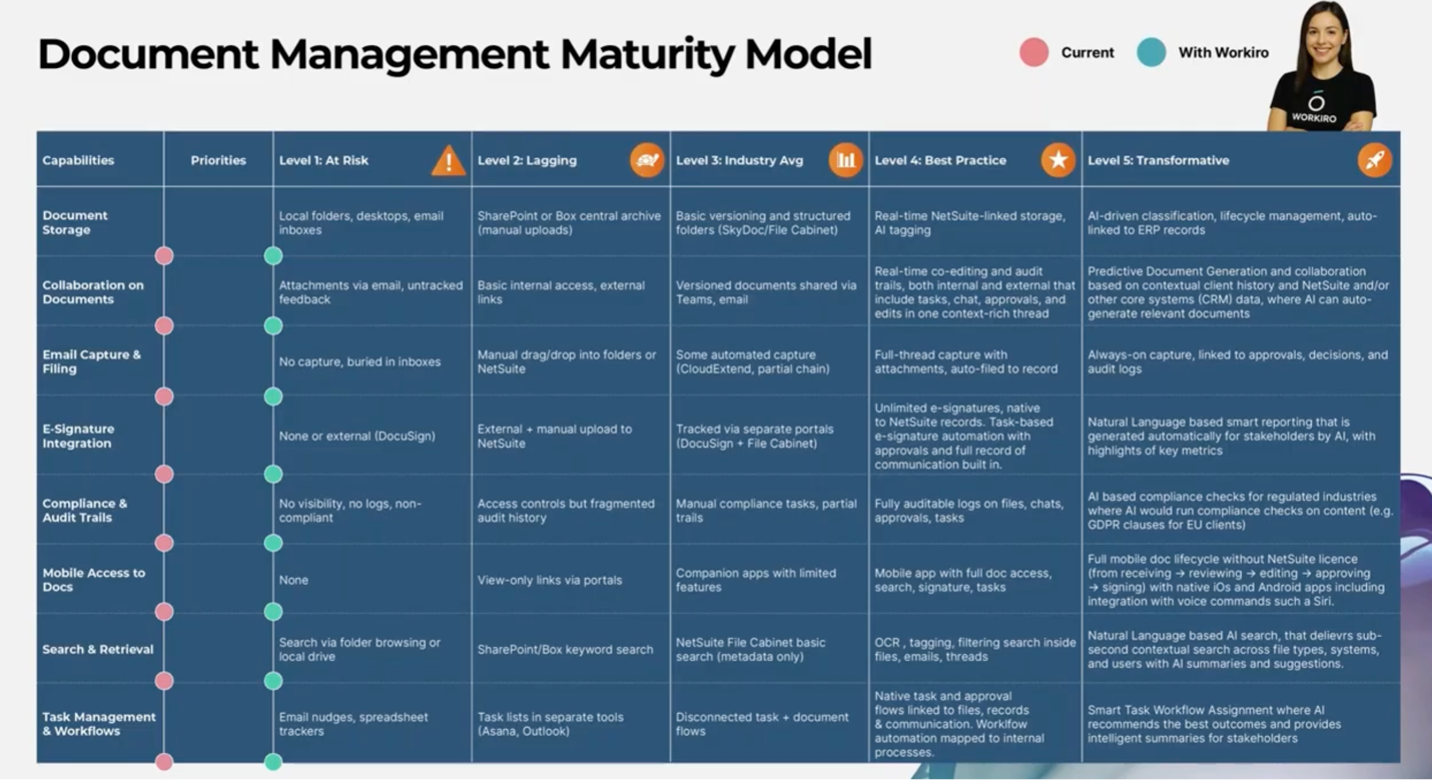
Below is a document management maturity model. It’s a great visualization aid, as businesses move from the left-hand side to the right-hand side of this document. You’ll see two dots on the screen, a red and a blue dot. This is what we use in our document management maturity model consultation to help businesses identify where they think they currently are and where they think they would like to be and how we can benchmark that against your peers.
Document Capture
If we think about document storage, a level one business may be holding document storage in a local folder. And this touches back onto search and retrieval. We generally store documents into a folder, hoping that we’ll probably never need to see them again. But inevitably, search and retrieval are a massive part of it because if I don’t need that document again, I file it away, it’s done. But somebody inevitably will need access to that. So, search and retrieval become a major part of the workflow. If on the left-hand side of this scale, we’ll be storing documents locally and then searching for documents using the standard folder browsing systems that we’ve all become typical used to on our local computer.
More businesses have moved into at least level two here, where we’re using solutions like SharePoint or Box for at least centralized archive that takes the file off my desktop and puts it into a central location, making it easier to share, assuming people know where to go and look and assuming that I’ve put it in the right folder and I’ve named it sensibly. That’s also part of the search and retrieval. Industry averages know people are using structured folders within Box and SharePoint. Or if you’re using NetSuite, you’ll be using the NetSuite file cabinet to store files. But where we’re really getting to be this best practice and transformative stage where we want to be able to store documents in real time against the file, not just when the document is complete. So, what I mean by that is we could be working on a contract with a vendor that we’re onboarding, for example, this contract is going back and forth by email, by a DocuSign. There’s very little visibility of it in the business. Once it’s signed and sealed and confirmed, at that point, somebody may go and file it in the right place.
Email Capture
Most businesses are on the left-hand side here. We’re not capturing emails in real time at all. Maybe an important email at the end of a chain of emails may get dragged and dropped into a folder as per level two suggests on this slide. Some businesses have moved to some form of automated email capture, but full email thread capture in real time, every email regarding any and every transaction and customer and contact and supplier and vendor. Having that tagged against the right record in NetSuite in real time is really the best practice that businesses are driving today. That level of visibility in real time is proving to be a huge time saver for businesses because we don’t have to wait to access emails
Compliance and Audit
Something that is very important to businesses, obviously given the risks that are associated with it. At stage one, we’re talking about a lack of visibility and non-compliance. Very few businesses will be there because they would be risking their survival, I would suggest, but most we see are kind of in between the next level of having some kind of flagging where there’s some audit control, some audit trails. NetSuite is very good at that from a finance perspective and a structured data perspective, but it’s fragmented in terms of things like documents and emails, and the audit history might not actually be there. First and controlling becomes more of a challenge. As we move up a scale, then we see manual compliance tasks being added with partial tails, but you know what we’re really looking for is something that’s fully auditable with where there’s logs attached to files, there’s chats and approvals and tasks and emails all included in that. So, there’s full visibility across the business when it comes to any compliance issues and audit requirements, removing any risk at the transformative end. Then we’re really pushing is more AI because a system that really checks for compliance and particularly in regulated industries where it would run the compliance checks on specific content that might be related to specific subjects.
Task Management and Workflows
When we go into task management workflows, a lot of what we see and what you guys will be familiar with is task management workflows, all that kind of information chat all in different applications and not connected. So it could be that that’s being done via email, by spreadsheets. What we then see as people move up the stage is that there will be those separate tools. So, Outlook might have a capability. Lots of people use things like Asana to manage those lists of tasks that must be done and spread them across the business. But what we then see from an average industry, average perspective is that that still allows for disconnection between tasks and document flows. And what we’re really trying to see is best practices, something that’s native from a task and approval workflow perspective linked to files, in a system like NetSuite, emails, communications, all mapped within the internal processes that are available for the business or help to run the business. At a transformative level, then we’re stepping it up again and then you get into smart task workflow assignment where an AI engine would recommend the best outcomes and provide intelligent summaries for the people that need to see that data and the key stakeholders.
E-Signatures
A level one might be where there’s no integration. So, signatures are either done manually or through tools like DocuSign with no link back to any of the systems. Maybe it gets signed and gets placed in a folder somewhere. Level two is it’s handled externally from NetSuite, but it requires a manual upload. Level three is where it would be tracked, but separate, we’d call it. So, e-signatures are tracked in portals like DocuSign but not connected directly to NetSuite. Best practice is seamless integration; therefore, you want signatures built into NetSuite, unlimited. Within your ERP, when you’re looking at that record and you have a question, you can answer all your questions there and then. And then moving finally towards a transformative stage with smart AI driven reporting, this is where the system automatically generates signature insights, highlights key metrics for stakeholders, ultimately saving reporting time and driving business decision support.
The Folder Illusion
An area where we can really find an opportunity for low hanging fruit within organizations to really win back time, win back trust with employees and customers is through removing or dispelling this folder illusion, as we call it, that’s really holding businesses back when it comes to modern day document storage. We’re all doing it already when we interact with products like Netflix, Amazon, or even our modern-day banking apps. Think about how we interact with content on these platforms? We don’t go digging through folders; we search by tags. As individuals, we can see the benefits and it does make our lives quicker, easier, better, more efficient. But what if you had a platform and a tool in place that took care of all this for you, allowing you and your employees to just get on with their day-to-day jobs. And it handled all of this in the background.
In business, there’s folders upon folders and the common problem of where do you file a document? Is it in the right place and can people access it easily? This becomes a real challenge. Your users attempting to look in the right silo of information to locate a document and hoping that they didn’t store it incorrectly or that the file is where they think it is and where it should be. Then you get into the whole concept of making sure it’s the right version of the file or the naming convention that you’ve set up as a business has been followed. So, that’s when NetSuite comes in.
What to look for in document management:
- Unlimited Storage
- Auto-Filing to NetSuite
- Native NetSuite Integration
- Built-in, Unlimited eSignatures
- Email Tread & Attachment Capture
- Complete Version History & Audit Trails
- Task Management & Workflow Visibility
- Share & Collaborate with Clients
To learn more about document management and view a live demo, watch the full webinar here.
ABOUT THE SPONSOR:
Workiro is an award-winning, intelligent document management system that combines email capture, e-signatures, seamless collaboration, and one intuitive platform designed for businesses that work closely with customers and third parties. Workiro ensures that all interactions, approvals, and documents are automatically saved and classified, eliminating manual effort and reducing risk. Learn more here: https://www.workiro.com/workiro-home
0 Comments